Tables are not responsive, which means that they are difficult to view on smaller screens. Because of this, we recommend avoiding tables and creating a text version instead, especially for scoring rubrics.
Example:
Instead of using this:
| 1-3 | 4-6 | 7-9 | 10 |
| The response is incomplete and does not adequately address the requirements of the prompt or task. Major elements are missing, inaccurate, or unclear, making it difficult to understand the intended message or purpose. The response may demonstrate limited knowledge of the topic, contain significant factual errors, or lack supporting details. Organization is weak, and the content may be confusing or inconsistent. Extensive revisions are needed before the response would be considered acceptable. | The response addresses some of the required elements but is only partially complete. While it demonstrates a basic understanding of the topic, it includes noticeable gaps, inconsistencies, or inaccuracies that reduce its overall effectiveness. Supporting details, examples, or explanations may be limited or underdeveloped. The organization is generally understandable but could be improved for greater clarity and flow. Moderate revisions are needed to fully meet the expectations of the task. | The response effectively addresses the majority of the requirements and demonstrates a solid understanding of the topic. Information is generally accurate, relevant, and well-organized, with appropriate supporting details or examples. The writing is clear and easy to follow, with only minor errors or omissions that do not significantly impact the overall quality. While there may be opportunities to improve clarity, depth, or polish, the response successfully meets the expectations of the task. | The response fully meets or exceeds all requirements of the task and demonstrates a thorough understanding of the topic. Information is accurate, complete, and thoughtfully presented with strong supporting details, examples, or evidence where appropriate. The response is exceptionally well-organized, clear, and engaging, with a logical flow that enhances readability. Writing is polished and free of significant errors, reflecting careful attention to detail and a high level of quality throughout. |
Instead, try an alternative like this:
1-3: The response is incomplete and does not adequately address the requirements of the prompt or task. Major elements are missing, inaccurate, or unclear, making it difficult to understand the intended message or purpose. The response may demonstrate limited knowledge of the topic, contain significant factual errors, or lack supporting details. Organization is weak, and the content may be confusing or inconsistent. Extensive revisions are needed before the response would be considered acceptable.
4-6: The response addresses some of the required elements but is only partially complete. While it demonstrates a basic understanding of the topic, it includes noticeable gaps, inconsistencies, or inaccuracies that reduce its overall effectiveness. Supporting details, examples, or explanations may be limited or underdeveloped. The organization is generally understandable but could be improved for greater clarity and flow. Moderate revisions are needed to fully meet the expectations of the task.
7-9: The response effectively addresses the majority of the requirements and demonstrates a solid understanding of the topic. Information is generally accurate, relevant, and well-organized, with appropriate supporting details or examples. The writing is clear and easy to follow, with only minor errors or omissions that do not significantly impact the overall quality. While there may be opportunities to improve clarity, depth, or polish, the response successfully meets the expectations of the task.
10: The response fully meets or exceeds all requirements of the task and demonstrates a thorough understanding of the topic. Information is accurate, complete, and thoughtfully presented with strong supporting details, examples, or evidence where appropriate. The response is exceptionally well-organized, clear, and engaging, with a logical flow that enhances readability. Writing is polished and free of significant errors, reflecting careful attention to detail and a high level of quality throughout.
If you decide to use a table anyway...
When presenting data in tabular form, DO NOT use spaces or tabs to align columns.
This applies to tables anywhere you use them, whether that's a SARE system or a word processor such as Microsoft Word. If you use spaces or tabs for aligning columns and change the font, your columns will no longer be aligned.
- You can copy and paste from blocks of cells from Excel - but the formulas will be lost. Just the values will be shown.
- You can also copy and paste tables or blocks of cells from Microsoft Word, Google Sheets or other word processors.
The best way is to insert a table is to use the Table button.
Drag your pointer over the grid that pops up when you hover over "Insert table" to indicate the number of rows and columns as you would in most word processors. You can always add or remove columns or rows later from the Table button.
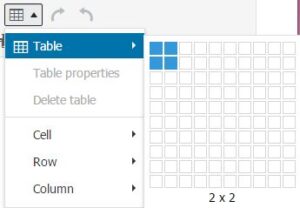
Before you have any text in the table, it is easiest to use your keyboard to move the cursor to the first cell and then start typing. The table will grow to fit the content.
To navigate from one cell to the next, press the [Tab] key or arrow on your keyboard or click on the target cell with your mouse. If you press the [Tab] key when you are in the last cell, another row will be added.
Do not change the width or the height of the table cells, rows or table by dragging divider lines or using the Cell/Row/Table properties.
Doing so may make the table look great on your screen, but when someone else looks at it with a different size window, device, monitor or font, it will not look as you intended. Please let the browser handle the sizing of the table, rows and columns.